但是由于不使用了,也不准备写完了……
为了教某人 NBU-OJ 上的题目,提前尝试了一下协作写代码,还挺有趣的(但是教别人还是太花时间了)。
正因为如此突然发现 Visual Studio (Code) 的 Live Share,非常好用,开箱即用。假如想要协作写代码的话强烈推荐。
我只是在这里详细记录一下如何使用以及每个功能有怎样的效果。
“删掉”的经历指 232d56b。
真的有好长时间没写过博客了,太懒了,除了上学就是摆烂和睡觉。
Live Share 简介
Real-time collaborative development from the comfort of your favorite tools.
在您最喜欢的工具中舒适地进行实时协作开发。
扩展页面就是这样介绍的。微软大概有底气认为 Visual Studio (Code) 就是您最喜欢的工具。事实上我就是它的忠诚用户。
这个简介的重点显然是您最喜欢的工具。之所以这么说,是因为当进行协作时你的 VS(Code) 主题、设置等还是你自己的设定,不会跟着主持者一样。
您喜欢的工具是方便的,因为 Live Share 可以只用网页进行协作,主持者(host)允许时协作者(participant)可以不用登录(但主持者还是要登 GitHub 或 Microsoft 账户的,而很多使用 VS(Code) 的人都至少有其中一个账号)。
接下来详细介绍用法及各个功能。
安装
多个平台都可以安装使用 Live Share。网页端甚至可以不用安装。
可以访问 vscode.dev 后打开扩展搜索“Live Share”(@id:MS-vsliveshare.vsliveshare)点击安装。
或者主持人可以直接访问 vscode.dev/editor/liveshare,点击安装这一步都省了。(P.S.: 这样子 Live Share 会变成“内置(@builtin)”扩展)
协作者可以不用在 Web 端手动安装,直接访问主持人的邀请链接就可以了(也会自动安装 Live Share 为“内置”扩展,并自动加入协作)。
Visual Studio 内置 Live Share,不必手动安装。
设置
Live Share 有很多项设置,在这里全部翻译(说明好像只有英文)解释一遍。
打开设置,展开 Extensions -> Visual Studio Live Share 子项,用图形化界面编辑设置。
要是会用 VSC 的 settings.json,用 "liveshare. 找设置就可以了。
这里分别用列表和 settings.json 形式解释,更方便。
列表版本
点击展开
| ID | 描述 | 默认值 |
|---|---|---|
liveshare.allowGuestDebugControl | 允许协作者启动和停止调试会话。当项为 true 时,即 GUI 设置里打上勾时协作者也可以在主持者的终端上运行和调试程序。详见[TODO]。 | false |
liveshare.allowGuestTaskControl | 允许协作者运行和终止工作区的任务(Tasks)。也请见上[TODO]。 | false |
liveshare.alwaysFollowHost | 确保主持者总是被跟踪。详见聚焦和跟踪。 | false |
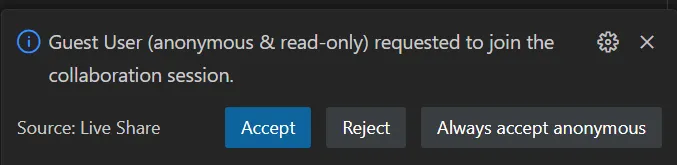
liveshare.anonymousGuestApproval | 控制如何处理来自匿名(指未登录的)协作者的加入请求。当项为 "prompt" 时,显示一个消息询问;当项为 "reject" 时会自动拒绝;当项为"accept" 时自动允许。消息和这个差不多 | "prompt" |
liveshare.autoShareServers | 控制是否自动共享当从集成终端(Integrated terminal)或已知的扩展(well-known extensions)启动的服务器。详见[TODO]。 | true |
liveshare.autoShareTerminals | 控制是否自动与协作者共享终端(自动共享时为“只读”)。详见[TODO]。 | true |
liveshare.codeLens | 控制是否展示用于启动协作的 CodeLens。(我不知道怎么用,恕不介绍) | true |
liveshare.comments | 控制是否允许在协作绘画中的评论(Comments)。 | true |
liveshare.connectionMode | 指定为协作使用的连接类型。当项为 "auto" 时优先选择直接连接,但是直接连接失败会回退到通过服务器(云)连接;当项为 "direct" 时使用直接连接;当项为 "relay" 时通过服务器连接。 | "auto" |
liveshare.diagnosticLogging | 启用 Live Share 的输出(Output)频道。 | false |
liveshare.diagnosticLoggingLevel | 指定 Live Share 的日志(Log)输出级别。可选值 "Trace","Debug","Info","Warning","Error","Critical","Off"。 | "Warning" |
liveshare.diagnosticMode | 启用诊断通知(Notification)和日志。 | false |
liveshare.featureSet | 控制是否启用预览功能。当项为 "stable" 时不启用;当项为 "insiders" 时启用预览功能,选择它即表示你同意 Pre-Release Software License Terms(这个链接目前好像无效)和 Privacy Statement | "stable" |
liveshare.focusBehavior | 指定如何响应来自其他协作者的关注请求(Focus requests)。当为 "accept" 时自动允许;当为 "prompt" 时弹出对话框请求。详见聚焦和跟踪 | "accept" |
liveshare.guestApprovalRequired | 控制主持者是否需要明确批准来宾请求加入协作会话。详见创建 | false |
liveshare.increasedGuestLimit | 将协作者个数限制从 5 增加到 30 个。 | true |
liveshare.joinDebugSessionOption | 控制协作者如何加入正在进行的共享调试会话。详见[TODO] | "Automatic" |
liveshare.keepAliveInterval | 设置在空闲会话中发送保持连接消息前的等待秒数,用于检测异常的网络断开。设置为 -1 可禁用发送保持连接消息。 | 20 |
liveshare.languages.allowGuestCommandControl | 允许访客通过代码操作(“快速修复”)和 CodeLens 运行任意命令。 | false |
liveshare.launcherClient | 指定当单击 Live Share 共享链接时启动的客户端。可选值 "web","visualStudio","visualStudioCode"。 | "web" |
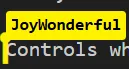
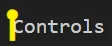
liveshare.nameTagVisibility | 控制何时显示协作者的名字标签而不是仅仅显示它们的光标。当为 "Activity" 时在协作者编辑时显示;当为 "Always" 时总是显示;当为 "Never" 时从不显示。图片见下面。 | "Activity" |
liveshare.notebooks.allowGuestExecuteCells | 允许协作者运行 Notebook Cells。 | false |
liveshare.openSharedServers | 控制是否用默认浏览器自动打开已共享的服务器。 | true |
liveshare.populateGitCoAuthors | 指定何时自动在你的 Git 提交信息中加上协作者署名(使用 Git-co-author trailer)。可选值 "always","never" | "always" |
liveshare.publishWorkspaceInfo | 控制是否将您当前的工作区文件夹发布给其他用户。 | false |
liveshare.sharedTerminalHeight | 共享终端的高,单位为字符。 | 50 |
liveshare.sharedTerminalWidth | 共享终端的宽,单位为字符。 | 120 |
liveshare.shareExternalFiles | 在协作会话期间自动共享协作者打开的外部文件。 | true |
liveshare.showInStatusBar | 显示或隐藏 Live Share 的状态栏项。可选值 "always","whileCollaborating","never" | "always" |
liveshare.showReadOnlyUsersInEditor | 控制只读协作者的光标和高亮的可见性。可选值 "whileFollowing","always"。 | "whileFollowing" |
liveshare.showVerboseNotifications | 控制是否显示详细通知,例如当访客加入或离开会话时。 | true |
JSON 版本
默认设置是第一个。| 分割可选的选项。
点击展开
{
    // Allow guests to start and stop debugging sessions.
    "liveshare.allowGuestDebugControl": false,
    // Allow guests to run and terminate workspace tasks.
    "liveshare.allowGuestTaskControl": false,
    // Ensures that the session's host is always followed.
    "liveshare.alwaysFollowHost": false,
    // Controls how to handle join requests from anonymous guests.
    "liveshare.anonymousGuestApproval": "prompt" | "accept" | "reject",
    // Controls whether web servers are automatically shared, when started from the integrated terminal or well-known extensions.
    "liveshare.autoShareServers": true,
    // Controls whether terminals are automatically shared with guests (read-only).
    "liveshare.autoShareTerminals": true,
    // Controls whether to show the CodeLens for starting a collaboration session.
    "liveshare.codeLens": true,
    // Controls whether to allow comments in collaboration sessions
    "liveshare.comments": true,
    // Type of connection used for collaboration; the default (auto) mode prefers a direct connection, but may fallback to a cloud relay if the direct connection failed.
    "liveshare.connectionMode": "auto" | "direct" | "relay",
    // Enables the Visual Studio Live Share output channel.
    "liveshare.diagnosticLogging": false,
    // Specifies the level of logging output from Visual Studio Live Share Extension
    "liveshare.diagnosticLoggingLevel": "Warning" | "Critical" | "Debug" | "Error" | "Info" | "Off" | "Trace",
    // Enables diagnostic notifications and logs.
    "liveshare.diagnosticMode": false,
    // Controls set of active features. By selecting `insiders`, you agree to the [Pre-Release Software License Terms](https://aka.ms/vsls-license-preview) and [Privacy Statement](https://aka.ms/vsls-privacy).
    "liveshare.featureSet": "stable" | "insiders",
    // Specifies how to respond to focus requests from other participants.
    "liveshare.focusBehavior": "accept" | "prompt",
    // Controls whether the host needs to explicitly approve guest requests to join collaboration sessions.
    "liveshare.guestApprovalRequired": false,
    // Increases the guest limit from 5 to 30.
    "liveshare.increasedGuestLimit": true,
    // Controls how the participant will join incoming shared debug sessions.
    "liveshare.joinDebugSessionOption": "Automatic" | "Manual" | "Prompt",
    // Sets the number of seconds to wait before sending keep-alive messages in an idle session, used to detect abnormal network disconnection. Set to -1 to disable sending keep-alive messages.
    "liveshare.keepAliveInterval": 20,
    // Allow guests to run arbitrary commands via Code Actions (“Quick Fixes”) and CodeLens
    "liveshare.languages.allowGuestCommandControl": false,
    // Specifies the client to launch when clicking on a Live Share URL.
    "liveshare.launcherClient": "web"  | "visualStudio" | "visualStudioCode",
    // Controls when to display a participant's name tag instead of just their cursor.
    "liveshare.nameTagVisibility": "Activity" | "Always" | "Never",
    // Allow guests to run notebook cells
    "liveshare.notebooks.allowGuestExecuteCells": false,
    // Controls whether to automatically open shared servers in your default browser.
    "liveshare.openSharedServers": true,
    // Specifies when to automatically populate your Git commit message with guest attribution (using the Git-co-author trailer).
    "liveshare.populateGitCoAuthors": "always"| "never",
    // Controls whether to publish your current workspace folder to other users
    "liveshare.publishWorkspaceInfo": false,
    // Height of shared terminal window, characters.
    "liveshare.sharedTerminalHeight": 50,
    // Width of shared terminal window, characters.
    "liveshare.sharedTerminalWidth": 120,
    // Automatically share external files opened by the host during a collaboration session.
    "liveshare.shareExternalFiles": true,
    // Show or hide the Live Share status bar items.
    "liveshare.showInStatusBar": "always" | "whileCollaborating" | "never",
    // Controls visibility of the cursor and highlights for read-only users.
    "liveshare.showReadOnlyUsersInEditor": "whileFollowing" | "always",
    // Controls whether to show verbose notifications, such as when a guest joins and leaves a session.
    "liveshare.showVerboseNotifications": true
}
普通协作
创建、加入与普通权限
创建
创建会话前,你要先登录 Microsoft 或 GitHub 账户(只要授权一次,之后不用授权了)。
打开的文件夹就是将要共享的文件夹。如果打开了该文件夹外部的文件,也会自动共享。(请确保不要在工作区中打开敏感文件)
主持者可以创建只读(Read-only)会话或可读写(Read/Write)会话。只读会话中所有文件都仅供协作者查看。可读写会话在协作者不登录加入时默认无读写权限,需要主持者授予(右键协作者,“Make Read/Write”)。
主持者可通过 liveshare.guestApprovalRequired 设置项为 true 启用批准来宾功能(默认为 false:来宾自动加入)。当来宾试图加入时,必须要经过主持者的批准。见下图。

加入
访问链接加入时,会弹出一个对话框询问用 VS, VSCode, vscode.dev 三种方式中的那种进行协作。一般来说选“Continue in Web”。
如果不要登录,选“Continue as Anonymous”。
只要打开 Live Share 栏,选择“Join”即可。
无论加入是否成功,文件夹都会退出。也就是说,窗口重开。
如果加入失败,重开的是一个空白窗口。也不知道这算不算 Live Share 一个奇葩的逻辑。
文件读写权限
聚焦和跟踪
先说明一下定义:
- 聚焦/关注?(Focus):让其他协作者跟踪你(协作者处将会提示:
xxx focused your attention.); - 跟踪(Follow):顾名思义,自动跟跟随另一个协作的位置。
可以通过单击右上角“喇叭”图标来执行 Focus。
单击协作者列表中的任何一个人或者右上角“图钉”图标来执行 Follow。
聊天(Chat)和讨论(Comment/Discussion)
[To Be Continued, 但也也许不更了?]